Contributor Works Directory
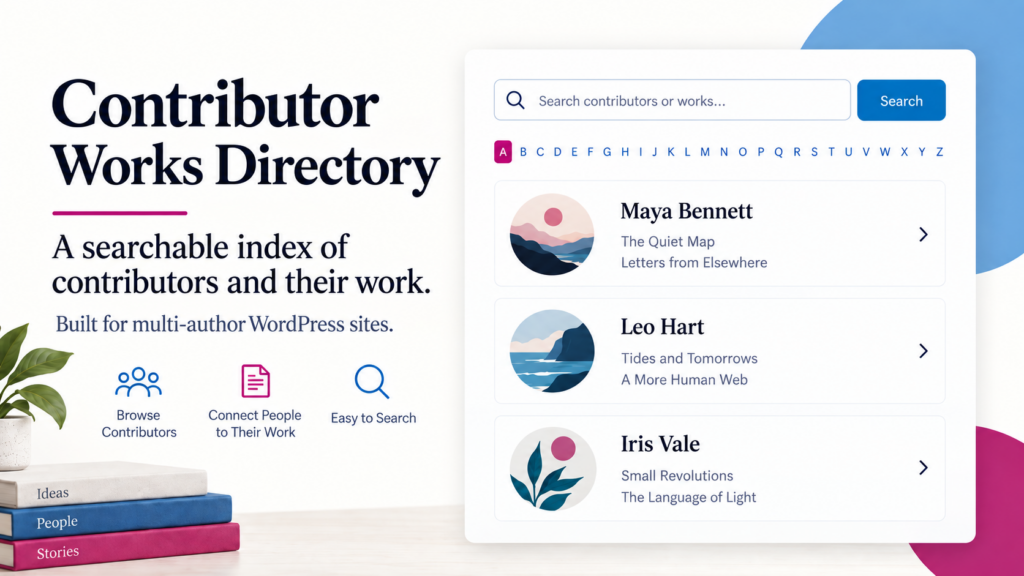
A practical WordPress directory for sites with many contributors and a growing archive.
Search contributors and work · A–Z browsing · taxonomy filters · multi-author support
Free WordPress plugin
WordPress.org listing in preparation.
remember to update. Contributor Works Directory builds the index from
work you’ve already published in WordPress.
If you’ve run a magazine, journal, press, archive, academic
publication, or other multi-author WordPress site for a while,
you probably know the problem. The archive grows. More people
contribute. Before long, the old Authors page is missing names,
missing recent work, or taking far too much time to maintain.
Contributor Works Directory was built for that situation. It
creates a public index of contributors and connects each person
with the work attributed to them on your site.
It uses the content and authorship information already in
WordPress, so publishing something new doesn’t mean going
back and editing a separate contributor page by hand.
Find a contributor
Search by name or browse alphabetically with familiar
A–Z navigation.
Find the work
See the published work already associated with each
contributor.
Use your own structure
Use categories, tags, post formats, or public custom
taxonomies for grouping and filtering.
Keep it current
The directory comes from published WordPress content
rather than a second list maintained by hand.
What the directory can show
Contributor Works Directory can be quite spare or fairly
detailed. You decide what makes sense for the site.
Along with contributor names and work titles, the directory
can show avatars, biographies, websites, dates, taxonomy
labels, work counts, and links to recent work. A compact index
can leave most of those options turned off.
There are three main ways to browse the index: by contributor,
by a selected taxonomy, or alphabetically by work title.
Search people and titles from the same box
The Contributor view uses one search field for both
contributors and works. Visitors don’t have to decide in
advance what kind of thing they’re searching for.
Contributor-name matches receive sensible priority, followed
by matches in work titles and other indexed information.
Matching is word-aware, which helps avoid some of the odd
results produced by simple character matching.
Clear the search and the ordinary alphabetical directory
returns.
A–Z navigation and name sorting
Long contributor lists are much easier to use with an
alphabet. Visitors can jump directly to the section they need
instead of scrolling through the entire page.
Contributors are sorted by last name by default. Display-name,
first-name, and custom sort-name options are also available
for names that need different handling.
Follow a work and come back to the same place
This sounds like a small detail until you use a long
directory.
A visitor searches for somebody, scrolls through the results,
opens a work, reads it, and presses the browser’s Back
button. Contributor Works Directory restores the previous
search, taxonomy filter, and scroll position instead of
dropping the reader at the top of a reset directory.
The restoration uses the browser’s History API. It
doesn’t require cookies, local storage, visitor tracking,
or search terms added to the public URL.
Links you can share
Contributor entries can have direct directory links. Instead
of telling somebody to open the directory and search for a
name, you can send a link that goes to that contributor’s
location in the index.
A built-in copy control makes those links easy to grab and
share.
Use the taxonomies already on your site
Categories, tags, post formats, and public custom taxonomies
can be selected for directory use.
Depending on the site, that might mean genre, department,
subject, publication section, media type, project, or
something completely different.
The selected taxonomy can be used for grouping, filtering,
exclusions, and labels beside individual works.
Multi-author WordPress sites
The plugin works with ordinary WordPress authors and also
includes direct support for PublishPress Authors and
Co-Authors Plus.
It doesn’t create guest authors or change authorship
assignments. It reads the authorship information your site
already has and uses that information to build the index.
Other authorship systems can integrate through the
plugin’s contributor filter.
Leave out what doesn’t belong
Not every WordPress account belongs in a public contributor
index. Editors, administrators, test accounts, or other users
may have published content without being people you want
listed.
Contributor Works Directory lets administrators exclude
specific contributors and taxonomy terms while leaving the
underlying WordPress content unchanged.
Diagnostics for older publishing sites
Sites that have been publishing for years tend to accumulate
a few surprises. The plugin includes diagnostics for duplicate
names, duplicate taxonomy labels, missing author references,
stale exclusions, and works that don’t have the selected
taxonomy.
The diagnostics identify the problem. They don’t silently
rewrite posts or user records.
Large archives
Contributor Works Directory was written with growing archives
in mind. Published content is scanned in bounded batches and
stored as compact cached record data. Only the grouping being
viewed is rendered instead of loading several complete
versions of a large index into the page at once.
New installations use an indexing batch size of 250. That can
be changed in Advanced settings if a particular site needs a
different balance.
A responsive multi-column presentation is also available for
wider directory pages.
Block editor or shortcode
The directory can be placed on a page using the Contributor
Works Directory Gutenberg block.
Sites using the Classic Editor, a page builder, or a workflow
built around shortcodes can use:
Privacy
Contributor Works Directory doesn’t require an Open Arts
Press account. It doesn’t include visitor analytics,
doesn’t phone home, and doesn’t call an external
API.
If avatars are enabled, WordPress’s normal avatar system
may use externally hosted avatar URLs according to the
site’s existing configuration.
Who might find it useful?
The original use case was a publishing site, but the problem
isn’t limited to literary magazines.
- Magazines and journals
- Independent presses
- Academic publications
- Arts organizations
- Archives
- News and magazine sites
- Nonprofit publications
- Collaborative blogs
- Other multi-author WordPress sites
If the standard WordPress author archive no longer answers
the simple question “Who has published here, and what
have they published?”, this plugin is meant to answer
it.
Installation
Install and activate Contributor Works Directory, then open:
Choose the post types, taxonomy, directory views, display
options, and exclusions you want. Then add the Contributor
Works Directory block or shortcode to a WordPress page.
The Plugins screen also provides Settings and Usage links, and
a one-time activation notice points administrators toward the
configuration page.
Contributor Works Directory
Free, open-source WordPress software developed by
Open Arts Press.
Why we built it
Contributor Works Directory grew out of a fairly ordinary
publishing problem.
As a publication accumulates contributors and work, manually
maintaining an Authors page becomes tedious and increasingly
likely to fall out of date. Yet that index can be one of the
useful ways into an archive: find a writer or artist, then see
what else they’ve contributed.
We wanted the index to maintain itself.
That became Contributor Works Directory.
Open Arts Press develops WordPress tools that begin with
problems encountered in our own publishing work. When a
solution looks useful beyond our own sites, we make it
available to other WordPress users.
Privacy
No built-in tracking. No external API. No Open Arts Press account required.